NBE Smart Lighting

Better lighting.
Less wasted energy.

Automatic lux balancing adjusts LED output as daylight changes—helping maintain your preferred illumination while reducing unnecessary artificial lighting.

Automatic daylight compensation · Gradual sleep dimming · Standard wall-switch operation
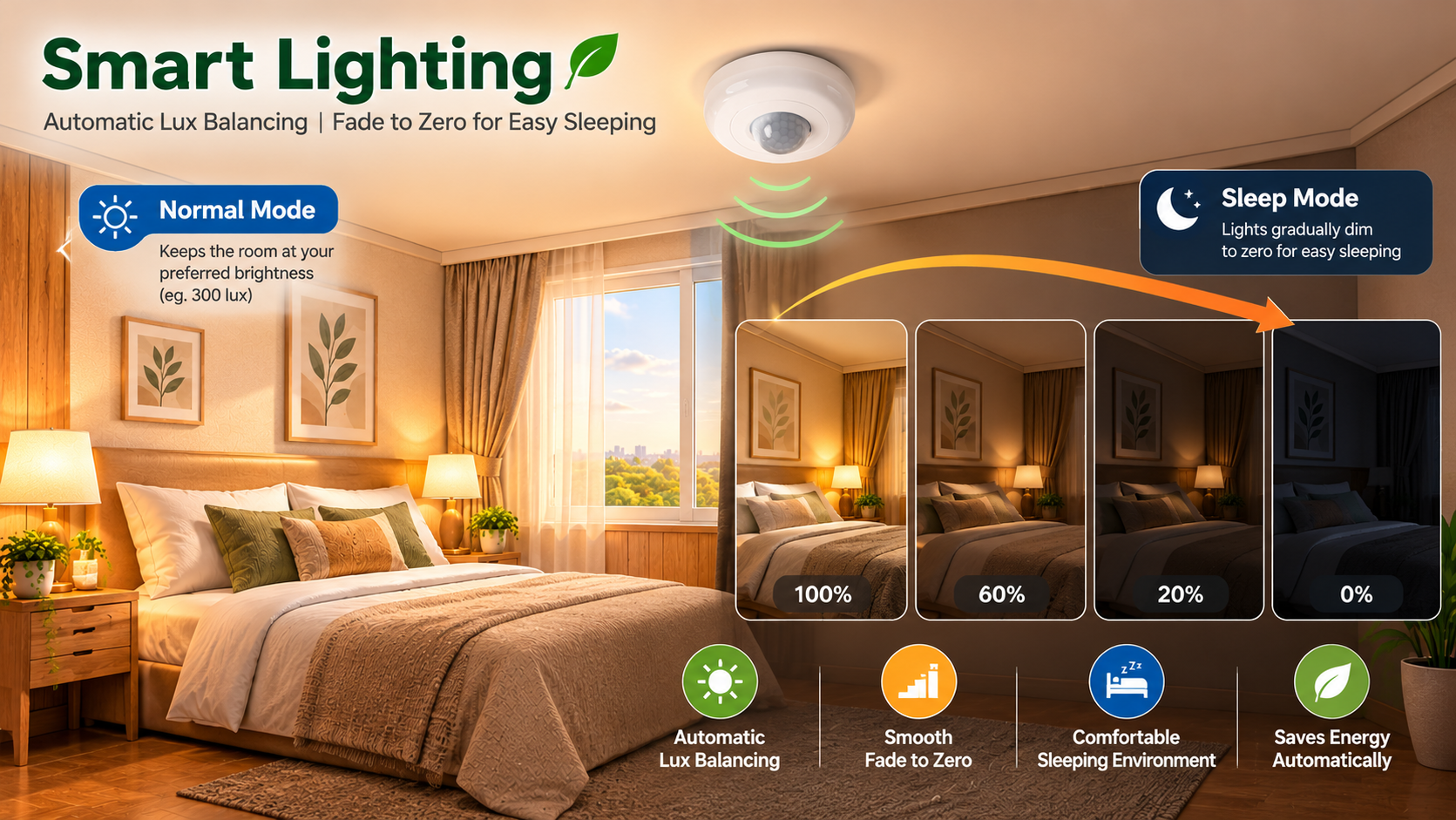
Smart lighting automatically balances illumination as daylight changes
Automatic Lux Balancing

The right amount of light, automatically

The light sensor measures the room's illumination. The controller adjusts the LED output to approach the target lux setting.

☀️
Daylight increasesNatural light enters the room
→
💡
LED output reducesController compensates automatically
→
🏠
Target lux maintainedWithin the available lighting capacity

If daylight decreases, LED output rises again. Actual lux can differ from target if the lighting system reaches its output limit.

01

Automatic balance

Choose a preferred target illuminance. The sensor and controller continuously adjust the artificial lighting as ambient light changes.

02

Sleep dimming

A quick OFF–ON of the wall switch starts sleep mode. The lights gradually fade to zero over the configured duration.

03

Familiar controls

Use a standard wall switch. Leaving power OFF for more than approximately three seconds resets the controller; the next ON starts normal mode.

Simple wall-switch operation

No special wall switch is needed for normal lighting and sleep mode.

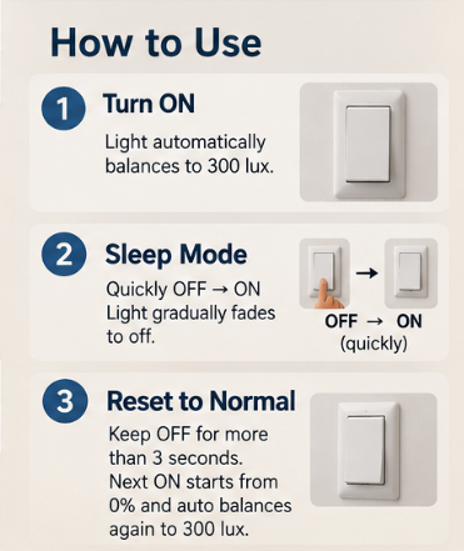
1

Normal lighting

Switch ON to start automatic lux balancing. The system adjusts LED output to the selected target.

2

Quick OFF → ON

Activates sleep mode. Lighting fades gradually to zero according to the configured timer.

3

OFF for more than 3 seconds

Fully powers down the lighting controller. The next ON restarts in normal mode.

Adjustable fade duration

The sleep fade duration is adjustable in the Android app. Choose a short fade or a longer duration, such as 30 minutes, to suit your preference.

The fade is gradual, not an immediate switch-off.

How to use Smart Lighting

Switch on for automatic balancing, quickly switch OFF and ON to start sleep dimming, or leave OFF for more than three seconds to reset to normal mode on the next ON.

Three simple steps for normal lighting, sleep mode and resetting to normal

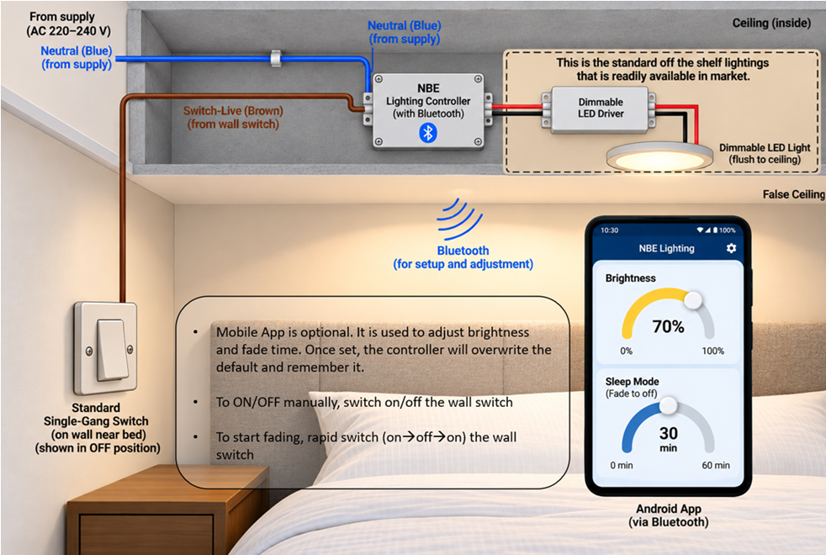
Designed for familiar wall switches

A standard wall switch controls power and starts sleep mode. The Android app is optional for configuring the preferred light level and fade duration.

Illustration of lighting controller, standard wall switch, LED driver and Bluetooth app
Watch the Demonstrations

Smart Lighting in action

See how automatic lux balancing, target brightness adjustment and sleep mode work in practice.

Videos open in a new tab on Google Drive.

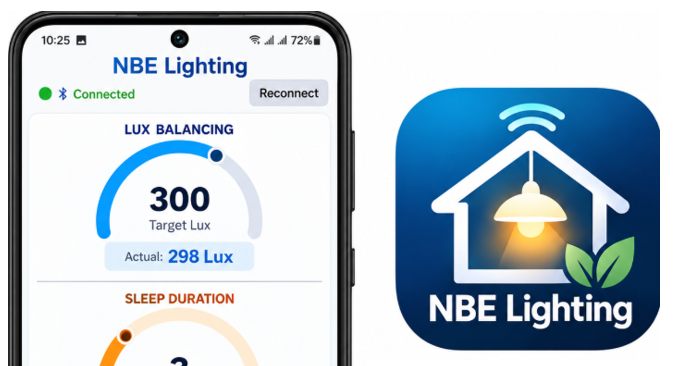
NBE Lighting Android app, app icon and QR code for installation

NBE Lighting Android app and launcher icon.

Bluetooth Android Control

Three gauges. Clear control.

1

Lux balancing

Set the target lux and view the actual measured illumination as the controller adjusts LED output.

2

Sleep duration

Set the fade-to-off time and view the remaining countdown while sleep mode is active.

3

LED Power Level

See the controller's LED drive level as a percentage. This is not a direct measurement of electrical power consumption.

NORMAL and SLEEP buttons show the active mode; they return to grey when Bluetooth disconnects.

Android application

Download NBE Lighting

Using your Android phone, scan the QR code to download the NBE Lighting app directly from our website and install it.

If Android asks for permission to install from your browser, review the prompt and allow installation from that source to continue. Bluetooth is used to connect to the lighting controller.

Scan to download NBE Lighting Android app
Install Android App

Scan with your Android phone camera

Explore smarter lighting with NBE

Interested in a demonstration or adapting lux balancing to your application? Discuss your requirements with our engineering team.

Contact NBE